AI and Enterprise UX: Stop Building for One Persona
AI and Enterprise UX: Stop Building for One Persona
AI has changed what we can build on the web.
Websites no longer need to be static pages with a hero section, three feature cards, a logo wall, and a “Book a Demo” button. We can now build interfaces that simulate products, respond to user input, and let visitors experience something before they ever talk to sales.
But having more capabilities doesn’t mean we should use all of them. Especially in enterprise software.
Consider a company building AI for high-stakes decisions - credit approvals, insurance claims, compliance reviews. The same interaction that feels impressive to an AI enthusiast might feel deeply concerning to a Chief Risk Officer.
That’s why the first question in UX shouldn’t be “What can we build?” It should be “Who needs to trust it?”
Four People, Four Different Questions
Imagine four people arriving at the same enterprise AI website:
- A Chief Risk Officer — Can I trust this decision? Can I explain it to an auditor?
- A CTO — How does this fit into our infrastructure? Can we govern it?
- An Investor — Is this a real category? Why will this company win?
- An Engineer — How does it actually work? Where does the data come from?
They’re looking at the exact same product. But they’re not evaluating the same thing.
A traditional B2B website tries to satisfy all four with one generic sentence like “Our AI-powered platform transforms complex enterprise workflows.” Technically that says something. From a UX perspective, it says almost nothing.
Personas Shouldn’t Be Demographics
A common mistake is defining personas like this: Sarah, 42, lives in London, enjoys coffee, works as a CRO.
Most of that is useless unless you’re building a coffee recommendation engine.
For enterprise UX, a useful persona answers four things:
- What are they trying to understand?
- What are they afraid of?
- What evidence would convince them?
- What would make them leave?
For a CRO evaluating an AI decision system, the answers are clear. They’re afraid of black-box outcomes and regulatory exposure. They’d be convinced by audit trails and source evidence. They’d leave the second they smell AI magic and unexplained hype.
This changes the entire interface. If your primary persona fears black-box decisions, putting a giant animated AI orb in the hero section isn’t neutral design — it actively communicates the wrong thing.
Trust Is an Interface Property
Trust is often treated as a copywriting problem. Companies add words like secure, enterprise-grade, explainable, auditable. But saying a system is auditable is weaker than letting someone audit it.
When trust is central to the product, don’t describe trust. Make it inspectable.
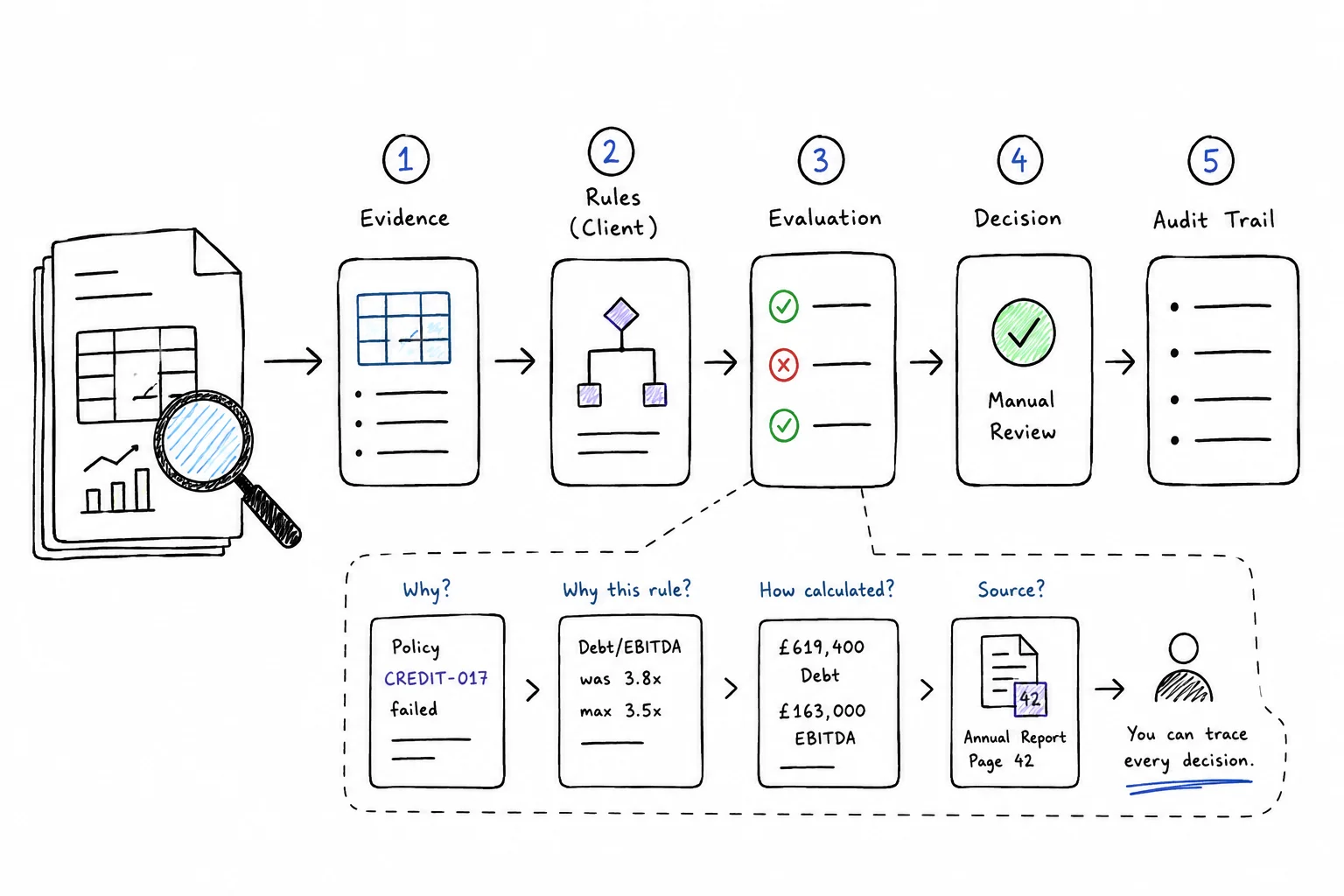
Consider a credit decision. A weak interface says “Manual review required.” A slightly better one says “Manual review required because Debt/EBITDA exceeds the permitted threshold.” A strong interface lets you trace:
Manual review → triggered by POLICY-CREDIT-017 → because Debt/EBITDA was 3.8x → calculated from £619,400 debt and £163,000 EBITDA → extracted from page 42 of the applicant’s annual report
Now explainability isn’t marketing copy. It’s an interaction.
AI UX vs Decision UX
Most AI interfaces are designed around generation. You enter a prompt. The AI thinks. Something appears. That works for writing, coding, and image generation where unpredictability is acceptable.
But it’s the wrong mental model for a regulated decision system.
Imagine a credit approval interface showing “AI is thinking…” and then “I think this loan should probably be approved.” For a CRO, that’s terrifying.
High-stakes decision UX needs a different visual grammar:
Evidence → Structured facts → Client-owned rules → Deterministic evaluation → Decision → Audit trail
The interface should communicate causality, not intelligence. The important question isn’t “How smart is the AI?” It’s “Why did this input produce this output?”
Avoid mysterious loading states. Avoid fake thinking. Avoid anthropomorphizing the system. Show the evidence. Show the rule. Show the result. Make the path reversible.
The Power of Counterfactuals
One of the most underused capabilities of modern web design is letting users play with the system.
Suppose a system rejects a credit application because Debt/EBITDA is 3.8x and the maximum is 3.5x. Now let the user change one value — drop it to 3.4x. The outcome changes from MANUAL REVIEW to APPROVED. The interface explains: “One case fact changed. All rules remained identical.”
In less than ten seconds, the user understands something that would take paragraphs of copy: The AI extracts evidence. The client’s rules determine the outcome.
That’s what interactive UX can do that static content can’t. It compresses understanding.
Progressive Disclosure
There’s a danger on the opposite side too. In trying to prove transparency, you can overwhelm visitors with JSON, policy IDs, confidence scores, timestamps, and execution logs. That impresses an engineer and loses everyone else.
The solution is progressive disclosure.
At the first level:
Manual review required because one credit policy failed.
Click once:
POLICY-CREDIT-017 failed because Debt/EBITDA was 3.8x against a maximum of 3.5x.
Click again:
The ratio was calculated from £619,400 total debt and £163,000 EBITDA.
Click again:
These values came from page 42 of the company’s annual report.
The complexity was always there. The interface reveals it according to the user’s intent.
One interface can serve multiple personas without pretending they all want the same amount of information. A CRO stops at the rule layer. An engineer goes all the way to source provenance. Neither had to select their role from a dropdown.
Good UX Reduces the Distance Between Claim and Proof
A traditional B2B website says “We provide fully auditable decisions.” A better website shows an audit trail. It says “Every fact is grounded in source evidence” and lets you click the fact to see the source.
The shorter the distance between a claim and its proof, the stronger the UX.
For a consumer product, delight may be the priority. For a developer tool, speed. For a high-stakes decision system, the priority is different:
Make causality visible. Make uncertainty explicit. Make evidence inspectable. Make control obvious.
The future of enterprise AI UX shouldn’t be about making systems look more intelligent than they are. It should be about making them easier to interrogate.
Because when the consequences of a decision are serious, the most convincing interface isn’t one that says “Trust the AI.”
It’s one that says “Don’t trust the decision. Trace it.”